

TradingView vs. ChartIQ: The Ultimate Comparison, the “Hidden” Trap, and The Sky-High Data Discrepancy
Hello viewers, welcome. Friends, welcome to this detailed discussion. In this article, I am going to tell you about a confusion we often face. If you use the Zerodha Kite app, which chart will you use? Which chart will be better? We frequently get confused in using the chart—should we use the default ChartIQ or switch to TradingView?
In this article, I am going to show you what the IQ Chart and the TradingView chart are, and what the fundamental difference between them is. I am going to compare the merits and demerits of these two charts.
But friends, before we get into the features, I have something much more critical to share. If you don’t see it with your own eyes, you won’t be able to believe it. The chart we look at daily shows a sky-high difference between platform-to-platform and paid-to-free versions. There is a lot of difference. I won’t leave that topic untouched. I will show you precisely what is happening, because on a good platform, a broker’s platform, if the difference is so big, how do we do technical analysis?
So, stick with me till the end. We will cover the settings and features, then reveal the massive data trap that might be affecting your trading.
Part 1: Important Resources and Disclaimer
Before we start the concept, I will take you to my website. Friends, this is my website. You can join the website for educational purposes. You will learn about stock behaviour and the insights it provides. The website is 100% free; there is no charge. Here, we provide you with free calls and targets for Nifty and Bank Nifty so you can get an excellent education. And please remember that all targets are provided for educational purposes only.
Apart from this, a necessary disclaimer: If you make a loss or profit on my given education account, then you will be responsible for it. For this, neither I nor my website will be accountable. Please note this, because the share market is risky, and option trading is even more dangerous. If you do option trading, consult your financial advisor before investing.
Part 2: How to Switch Between Charts in Zerodha
Let’s start. Friends, this is the Zerodha Kite app account. If you do not have an account in the Zerodha Kite app, you can open one; the link is in the description.
Zerodha opens with a dashboard. On the left side, we have a watchlist. In this watchlist, you can click on the chart you want, and the chart will open. By default, in Zerodha, the IQ Chart (ChartIQ) is the default setting. Many people use it simply because it is there. But if you want to see the TradingView chart, there is a simple process to change it.
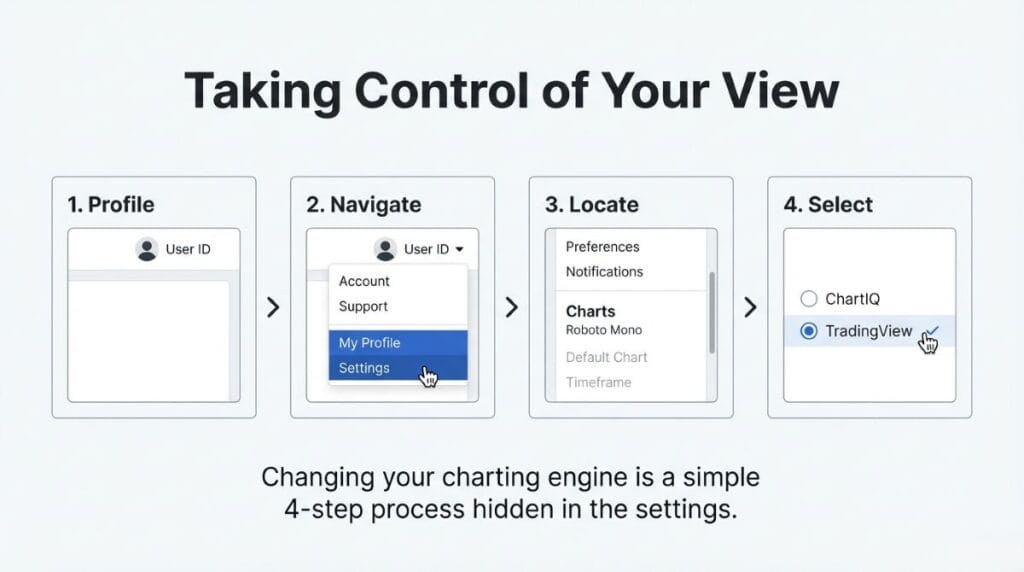
Step-by-Step Process:
- Go to Your Account: Click your user profile icon in the top right corner.
- Select “My Profile” from the dropdown.
- Scroll to “Settings” and find the “Charts” category.
- Choose “ChartIQ” or “TradingView” using the radio buttons.
First, I will show you ChartIQ, and then TradingView.
Part 3: Deep Dive into ChartIQ Features
Let’s see, friends. Here I am showing you the chart of an ONGC stock as an example. So here you can see this chart is ChartIQ. The process is opening, you stay with me.
Full Screen Mode (Pop Out)
In ChartIQ, if you want the chart to be full screen, you have to look for the “Pop out chart” icon. Click on the pop-out chart icon. It will become full-screen. This is ChartIQ full screen. You can see the candles in ChartIQ; the view looks like this. It is a very classic, clean look.
Timeframes and Customization
You can set any settings in this chart. I will show you the chart’s performance.
- Time Period: This is the chart time period selector.
- Candlestick Value: This is where you change the style. I will fix it in 5 minutes. This is the view.
- Saving Views: If you want to save the view, click on “Save.” If you want to access your previously saved layouts, click on “Saved Views.”
Display Options
In the next “Display” tab, you can see various options like Candle, Bar, Colored Bar, Line, etc. You can change the visual representation of the price here.
Studies (Indicators)
In the next tab, which is called “Studies,” you can see the technical analysis indicators. All these indicators are free here. You have RSI (Relative Strength Index), MACD, and Moving Average. All these indicators are free.
You can set the values you want. For example, if you’re going to use the RSI, you can select it and customize the period. To learn detailed strategies for RSI, MACD, and Moving Average, I have written separate articles on each indicator, so you can open them to learn more. You can use those indicators to do the technical analysis effectively.
Layouts and Events
In the following “Layout” tab, you can save or clear the preferences. In the subsequent “Events” tab, you can see the orders or corporate actions.
Part 4: Deep Dive into TradingView Features
Now, let’s look at the second option. If you went to your settings and selected TradingView, the interface changes significantly.
Friends, this is the TradingView chart.
- Visuals: You can see that the chart on TradingView looks different. Below, you can see that the volume bars are displayed differently.
- Indicator Availability: What happens in this is that the indicators in this chart will not be found in the IQ chart, and the indicators in the IQ chart will not be found in this chart. There is a specific library difference.
- User Preference: Some traders prefer TradingView because it feels smoother or more modern, while others prefer ChartIQ for its robust “Studies” menu.
Part 5: The “Sky-High” Data Difference (The Trap)
Now, friends, I am coming to the most serious part of this article. This is something that shocked me. As I said, if you don’t see it with your own eyes, you won’t be able to believe it.
We rely on these charts for our hard-earned money. We do technical analysis based on these lines and numbers. But what if the numbers are wrong?
In the chart we are looking at, there is a sky-high difference between platform-to-platform and paid-to-free. There is a lot of difference.
The Reliance Industries Case Study
I won’t leave this topic easily. I want to show you deep down what is happening.
Many of my students say, “Sir, sometimes I get one or two points difference.” That is understandable. But what I got today in a frontline stock like Reliance, with huge volume and a continuous chart… how does it work there? I shared this with you today in the Public Telegram Group.
Let’s look at the Reliance Daily Chart.
The Setup
- I opened the Reliance chart on the daily timeframe.
- I applied the EMA (Exponential Moving Average).
- Specifically, the 200 EMA. The line of sky color I am taking here shows the 200 EMA. It is written clearly.
The Discrepancy
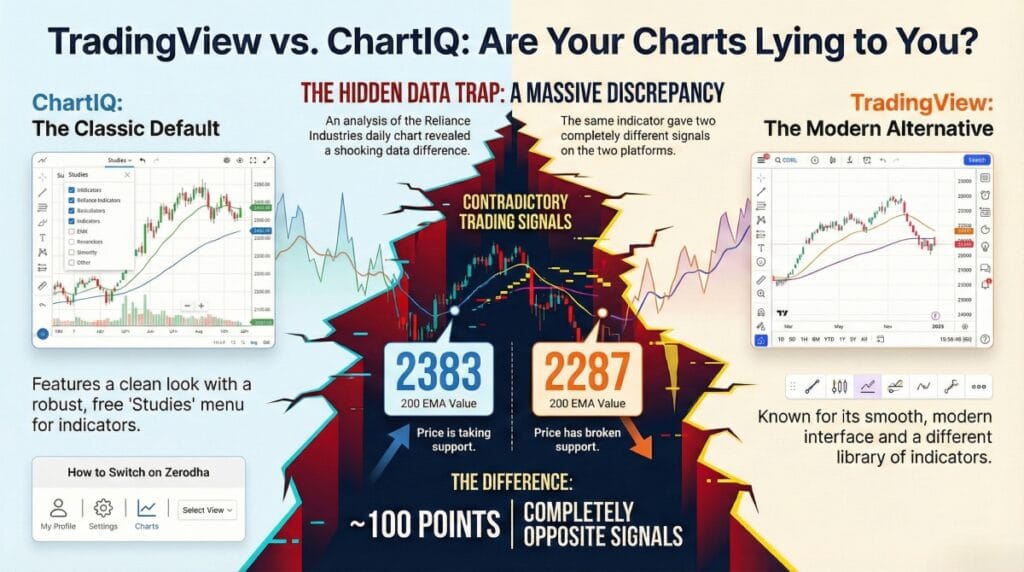
- On the Broker’s Platform (ChartIQ): When I look at the 200 EMA on the Zerodha ChartIQ platform (the “paid” version), it shows 2383.
- On the TradingView Website (Free Version): When I look at the same stock, on the same daily timeframe, on the free TradingView website, the value shows 2287.
The Calculation
| Platform | Value |
| ChartIQ | 2383 |
| TradingView | 2287 |
Friends, there is a difference of nearly 100 points.
I mean, a 100-point difference? In a stock price of 2000 to 2400? This is a vast, sky-high difference.
Investigation and Debugging
I thought, “Maybe I am making a mistake. Maybe the settings are different.” So I checked everything to be sure.
- Simple vs. Exponential: I checked if one was a Simple Moving Average (SMA) and the other was Exponential (EMA). I added “Moving Average” again. If I add “EMA” or “Moving Average,” there is no other zero thing. Exponential is not different. Even if I switch both to the Simple Moving Average, the difference remains huge.
- Smoothing and Offset: I went deep into the settings. I checked the “Smoothing Line.” On TradingView, it was set to 5. The “Offset” was set to 0. I went to the broker’s chart and matched these settings exactly.
- The Result: Even after matching the settings, the broker’s chart says 2383, and the TradingView chart says 2287.
Why This Is a Trap
This is a massive trap for retail investors.
- If you are following the TradingView chart, you might think the price has broken the support or is far away from the moving average (at 2287).
- If you are following the broker’s chart, you might see the price taking support exactly at the average (at 2383).
If that is wrong, what will you learn? My head is a little hot seeing these things. It is not acceptable. In a good platform, in a broker’s platform, the difference is so big. I mean, how do we do the technical analysis? If the data itself is contradictory by 100 points, our strategies fail.
Part 6: Market Volatility and Context
Why is this accuracy so important right now? Let’s discuss today’s market context. See the market today—the Nifty.
It is completely choppy. It goes up, it goes down. A lot is going on there. In the last 15 minutes, the volatility was extreme.
Looking at global cues, the US Market (Dow Jones) is about 200 points higher.
And there is big news: The Bitcoin ETF has been approved.
- Bitcoin is now running at 6% plus. Above 5%.
- So Bitcoin’s ETF has come. I mean, okay, it will also be an index like this. I don’t fully understand that thing, so it’s not right to comment, but the ETF has arrived.
- What is happening abroad? You need to know. That’s what I’m saying.
So let’s go to our market now. If the US market keeps this 200-point gap… it shows in 19,414. I refreshed it, 414.
If Nifty opens above this… The problem is that it is opening above. It was open in 377 today. It doesn’t stay at the peak. The closing is going down. So if it begins above this, I don’t know what will happen.
In this kind of market—where the closing is going down, where gap-ups are happening due to global news like Bitcoin ETFs—you need precise levels. If your chart is lying to you by 100 points, you are trading blind.
Conclusion
So, friends, that is the reality.
- We learned how to switch charts in Zerodha: Go to Profile -> Settings -> Select ChartIQ or TradingView.
- We learned the features: Pop-out, Studies, and Save Views.
- But most importantly, we learned about the “Huge Different Chart” issue.
You have to be careful. Do not unquestioningly trust. Cross-check your levels. If you are using the free TradingView to analyse and the broker’s ChartIQ to execute, you might be seeing two different worlds.
I hope you all are doing well. Please subscribe to the website if you are new. Also, if you want to do a live class with me, please join me on my website.
Thank you for reading. Stay cautious, check your charts, and trade safely.